Higgsfield Genjutsu prompts that stay short
Higgsfield Genjutsu does not need a long prompt. A preset can do the whole job, and a short description is optional when you want a specific change.
The best Higgsfield Genjutsu prompts name one thing to change and say what must stay the same. Use the builder below, or copy a template and swap in your own details.
Higgsfield Genjutsu prompts builder
Runs in your browserFive rules for Higgsfield Genjutsu prompts
Good Higgsfield Genjutsu prompts read like a one-line edit note. They say what changes, what it becomes, where it happens and what must not move.
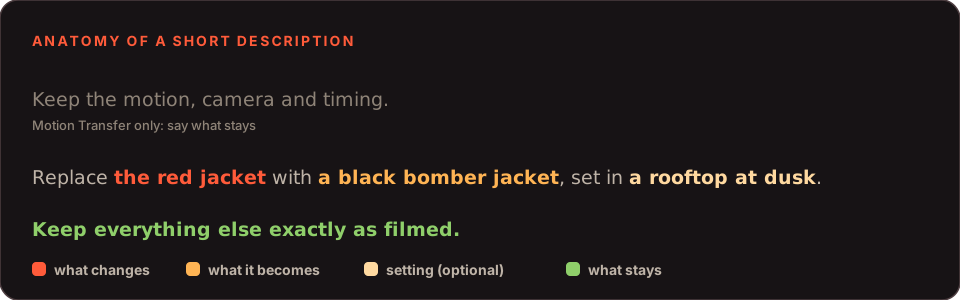
- Change one thing. Several changes in one run make it hard to tell which instruction caused a problem.
- Describe the destination. Say what the element becomes, not what the clip already shows.
- Say what stays. A closing sentence such as "keep everything else as filmed" protects the rest of the shot.
- Let references carry identity. Faces and products come from pictures, not adjectives.
- Keep it to a sentence or two. Higgsfield describes the description as short and optional.
Higgsfield Genjutsu prompts as formulas
Three formulas cover most requests. Replace the brackets with your own details.
| Use | Formula | Filled in |
|---|---|---|
| Object Swap | Replace [what changes] with [what it becomes]. Keep [what stays] as filmed. | Replace the red jacket with a black leather bomber jacket. Keep everything else as filmed. |
| Motion Transfer | Keep the motion, camera and timing. Replace [who or what] with [reference], set in [place]. | Keep the motion, camera and timing. Replace the dancer with the character in the reference images, set in a neon street at night. |
| Style change | Keep the motion. Turn the clip into [look] with [two or three traits]. | Keep the motion. Turn the live-action clip into a hand-drawn anime look with flat colour and clean outlines. |
Fourteen Higgsfield Genjutsu prompts to copy
Starting points, adjust to your clipReplace the jacket with a black leather bomber jacket. Keep the person, pose and background exactly as filmed.
Replace the bottle in her hand with the product in the reference image. Keep the hand position, lighting and camera unchanged.
Change the text on the sign to "OPEN LATE". Keep the sign, the street and everything else as filmed.
Change the background to a rooftop at dusk. Keep the person and their movement untouched.
Change the weather to light rain at dusk. Keep the person, the camera and the motion as filmed.
Replace the red car with the white van in the reference image. Keep the road, the camera and the motion as filmed.
Keep the motion, camera and timing. Replace the dancer with the character in the reference images, wearing the same outfit in every shot.
Keep the motion, camera and timing. Rebuild the scene as a quiet neon-lit street at night with light rain.
Keep the motion, camera and timing. Turn the live-action clip into a hand-drawn anime look with flat colour and clean outlines.
Keep the motion, camera and timing. Turn the animated clip into a realistic live-action scene with natural skin and daylight.
Keep the motion, camera and timing. Replace the actor with the mascot in the reference images and keep its colours and shape consistent.
Replace the presenter and the cafe with the presenter in the reference images in a Tokyo shopfront. Keep the pacing, gestures and camera moves of the original ad.
Keep the motion, camera and timing. Replace the presenter with the woman in the reference images and put the product from the last image in her hand.
Keep the motion, camera and timing. Use the character in the reference images and keep the same face, hair and outfit throughout.
Five mistakes in Higgsfield Genjutsu prompts
| Mistake | Fix |
|---|---|
| Describing the clip instead of the change | Say what the new element is, not what the footage already shows. |
| Changing several things at once | One change per run, so you can tell which instruction caused a problem. |
| Using adjectives for a face | Attach reference pictures. Words alone will not hold a face from shot to shot. |
| Forgetting what must stay | Finish with "keep everything else as filmed" or name what matters. |
| Writing a paragraph | A sentence or two is enough. Long descriptions compete with your footage. |
Presets or Higgsfield Genjutsu prompts?
Higgsfield offers 30+ presets, and a preset alone can complete a run. Start there when you want a quick look at what the tool does to your clip, then add a sentence only when the result drifts from what you wanted.
Save your best Higgsfield Genjutsu prompts in a note so you can reuse them across clips. If you are new to the tool, the step-by-step guide shows where the description box sits in the flow, and the cost page explains how to keep early tests cheap.
Higgsfield Genjutsu prompts: questions
Do I need Higgsfield Genjutsu prompts at all?
No. Higgsfield says a preset alone can drive the entire change, and a short description is optional when you want something more specific. Prompts help most when the result drifts from what you wanted.
How long should Higgsfield Genjutsu prompts be?
One or two sentences. Name the thing that changes, say what it becomes, and say what must stay the same. Let your reference images carry the look of a person or product.
Should I describe the original clip in my prompt?
No. The tool already has your footage. Describe the destination, meaning what the new element should be, not what the clip contains.
Do these Higgsfield Genjutsu prompts guarantee a result?
No. They are starting points. The outcome depends on your clip, your reference images and the preset you pick, so expect to adjust a word or two between runs.
Can I paste a long prompt from another AI video tool?
It is better not to. Genjutsu starts from your footage, so a long scene description competes with what is already in the clip. Keep the description to the change.
Where do I type the description in Higgsfield Genjutsu?
After you choose a mode and upload your clip and references, the generator offers presets and a short description box. See the step-by-step guide for where it sits in the flow.
Can you write my brief for me?
If you order a video from us, a sentence or two about what should change is all we need, and the builder above can write it. Order a video for $9.90.